
If you are wondering how to find your P60 online, your first stop should be your employer’s payroll portal — not HMRC. Your P60 is issued by your employer, and there are three ways to get a copy.
Which one works depends on whether you still work there, how far back the tax year is, and whether the company still exists. This guide covers all three, plus what to do when none of them works. Need a P60 document for your records? See our P60 options from £35, same day by email.
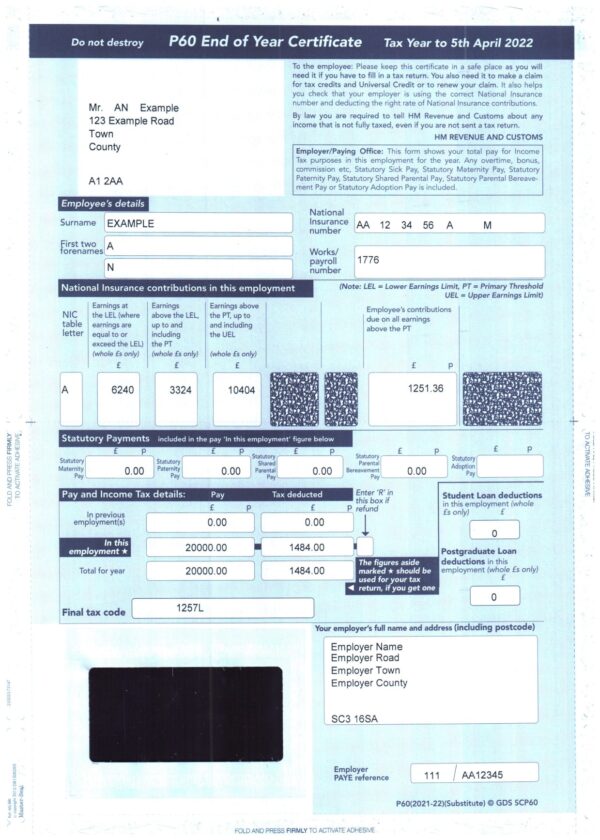
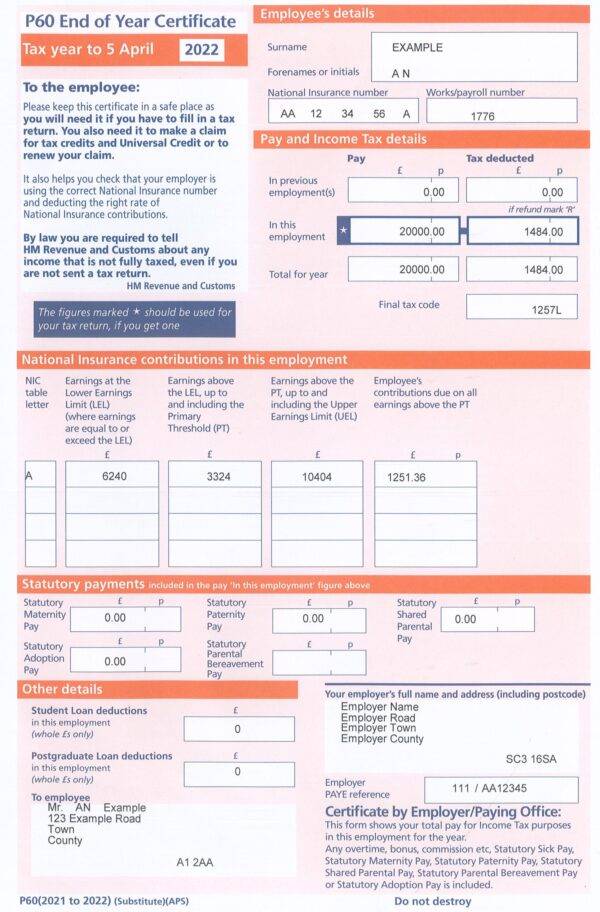
Need a P60 document for your own records?
We supply P60 certificates for tax years 2019 to 2025.
P60 Standard Red — £35 · Mailer P60 — £38 Same day by email, or next working day by post.

What is a P60?
A P60 is your End of Year Certificate. It summarises everything you earned in one tax year and how much income tax and National Insurance was deducted.
Your P60 shows:
- Your total gross pay for the tax year
- Income tax deducted through PAYE
- National Insurance contributions
- Your tax code at the end of the year
- Your National Insurance number and payroll number
- Your employer’s PAYE reference
You only receive a P60 if you were still employed on 5 April, the last day of the UK tax year. If you left the job before that date, you receive a P45 instead. If you are self-employed, you do not receive a P60. Your income record is your Self Assessment tax return.
When do you get your P60?
The UK tax year runs from 6 April to 5 April. Your employer must give you your P60 by 31 May following the end of the tax year. For the 2025/26 tax year, which ended on 5 April 2026, your P60 was due by 31 May 2026.
Most employers issue P60s in April or early May. Some send a paper copy, others upload it to a payroll portal. If it is past 31 May and you have not received yours, your employer is late, and you can ask for it directly.
How to find your P60 online: three ways to get a copy
1. Check your employer’s payroll portal
The quickest way to find your P60 online is through your employer’s payroll system. Most UK employers store it there as a PDF you can download at any time. Log in and look under headings like Documents, Tax Documents, Year End, or Payslips.
Common systems and where to look:
- Sage HR — Documents, then Year End Documents
- Xero Me — Payslips, then P60
- BrightPay Connect — Documents section
- MyePayWindow — Annual Documents
- Employment Hero — Payroll, then Tax Documents
If you have forgotten your login, use the password reset before contacting payroll. It is usually faster.
2. Ask your employer or former employer
If the portal does not have it, ask payroll or HR directly.
Employers must keep PAYE records for at least three years from the end of the tax year they relate to. Many keep them for six years. This means a request for a P60 from the last three tax years should normally be possible.
Send the request in writing so there is a record. Include:
- Your full name, and any previous name you used while employed
- Your National Insurance number
- Your payroll or employee number, if you have it
- The exact tax year you need, for example 2024/25
- Where to send it
Allow around two weeks for a former employer. Current employers are usually faster.
If the company has closed down, search the Companies House register to find out whether it was dissolved or taken over. If another company took it over, that company may hold the payroll records.
If you were not working during a tax year, you will not have a P60 at all. Read more about how to get a P60 if you are unemployed.
3. Use your HMRC personal tax account
HMRC does not issue P60s and cannot send you a copy of one. Your P60 comes from your employer. However, HMRC holds the same information your P60 contains, because your employer reports it under Real Time Information every time you are paid.
If you cannot find your P60 online through your employer, HMRC holds the same figures your P60 contains. You can view your pay and tax records in two places.
Your personal tax account
Sign in at gov.uk/personal-tax-account using your Government Gateway ID. Go to Pay As You Earn, then Check current tax year, or select a previous year. You will see your taxable pay and the tax deducted by each employer.
The HMRC app
Free on iOS and Android. Sign in with the same Government Gateway details or set up a passcode. Your income history is under Pay As You Earn.
You can print or save this record as a PDF. It is not a P60 and does not look like one, but it comes directly from HMRC and shows the same figures.
If you do not have a Government Gateway ID, you can create one at gov.uk. You will need your National Insurance number and either a UK passport, a recent payslip, or a P60 from another year to verify your identity.
Lost your P60?
If youIf you have tried to find your P60 online and it is not in your payroll portal or your email, your employer can issue a replacement copy. By convention, it should be marked as a duplicate.
What to do, in order:
- Check your email. Many employers send P60s as PDF attachments.
- Check the payroll portal, including any archive or year-end folder.
- Ask your employer for a replacement copy in writing.
- Use HMRC instead. If your employer cannot help, download your pay and tax record from your personal tax account.
For most purposes, such as checking your own tax position or providing evidence of earnings, the HMRC record is accepted. Some organisations ask specifically for a P60, so it is worth checking what format they will accept before you spend time chasing one.
Getting a P60 from a previous employer or an old tax year
Trying to find your P60 online for an older tax year is harder, but not impossible. What works depends on how far back you need to go. Older P60s are harder to get, but not impossible.
What works depends on how far back you need to go.
Within the last three tax years: Your former employer is still required to hold the records. A written request should be enough.
Three to six years ago: Many employers keep records for six years for other legal reasons. It is worth asking, but they are not obliged to provide it.
More than six years ago: Your former employer is unlikely to still hold the record. Your HMRC personal tax account is the better option, as HMRC holds PAYE income history going back several years.
If the employer no longer exists: Check Companies House. If the business was taken over, the new owner may hold the records. If it was dissolved, records may have been destroyed, and HMRC will be your only source.
What if none of these work?
Occasionally every route fails. The employer has closed, the records are gone, and the tax year is too far back for HMRC to help.
In that situation, your options are:
- Use bank statements showing salary payments as evidence of income
- Ask HMRC for a written confirmation of your employment history
- Use your Self Assessment return, if you completed one for that year
You can also see our replacement P60 service.
P60, P45 and payslips: what is the difference?
| Document | When you get it | What it shows |
|---|---|---|
| Payslip | Every payday | Pay and deductions for one pay period |
| P45 | When you leave a job | Pay and tax up to your leaving date |
| P60 | After 5 April, by 31 May | Total pay and tax for the whole tax year |
You get a P60 only if you were employed on 5 April. If you left before then, you get a P45 covering that employment instead. If you had two jobs during the tax year and were still in both on 5 April, you should receive a P60 from each employer.
For a fuller comparison, see the difference between a P45 and a P60.
Frequently asked questions
How do I find my P60 online?
Check your employer’s payroll portal first, as that is where most P60s are stored. If it is not there, ask your employer directly or use your HMRC personal tax account.
Can I download my P60 online?
Yes, if your employer uses a payroll portal. Log in and look under Documents or Year End. If your employer still issues paper P60s, there will be no online copy.
Can HMRC give me a copy of my P60?
No. HMRC does not issue P60s — your employer does. HMRC can show you the same pay and tax figures through your personal tax account or the HMRC app, which you can print or save as a PDF.
What if my employer has closed down?
Check Companies House to see whether the business was dissolved or taken over. If another company took it over, they may hold the records. Otherwise, use your HMRC personal tax account.
How long do employers keep P60 records?
At least three years from the end of the tax year the records relate to. Many keep them for six years.
How far back can I see my income on my HMRC account?
Your personal tax account shows several previous tax years. If you need a year that is not listed, contact HMRC directly.
Do I get a P60 if I am self-employed?
No. P60s are issued through PAYE. If you are self-employed, your income record is your Self Assessment tax return.
Do I get a P60 if I have two jobs?
Yes — one from each employer you were still working for on 5 April.
I never received my P60. What should I do?
Ask your employer first, as they may not have sent it. If it is past 31 May, they are late. If they do not respond, use your HMRC personal tax account instead.
Can I get a P60 for a year I did not work?
No. A P60 is only issued by an employer for a tax year in which you were paid through PAYE.
Final Thoughts
Knowing how to find your P60 online saves time when you need proof of your earnings. Check the payroll portal first, then ask your employer or former employer in writing, and use your HMRC personal tax account if neither works. If you need a record from more than six years ago, HMRC is usually your only remaining option.